
Part of our Contractor Guides
The best accounting software for contractors running a small business is QuickBooks Online Plus, because Plus adds project profitability tracking and the field service apps contractors use, such as Jobber, Housecall Pro and Knowify, sync with it. Xero suits teams that want unlimited users, Zoho Books is the cheapest way to get progress invoicing, and FreshBooks and Wave fit solo trades. Contractors who need AIA billing, retainage and certified payroll should look at construction accounting software: Sage 100 Contractor, FOUNDATION or QuickBooks Desktop Enterprise.
Disclosure: some vendor links on this page may be affiliate links. If you sign up through one, we may earn a commission at no extra cost to you. Sponsored placements are labeled and sit outside our picks. How we make money.
Contractor accounting is different from shop or office accounting in one way that matters: every dollar has to land on a job. A plumber needs to know whether the Henderson repipe made money; a general contractor needs to bill a pay application with retainage held back. Generic small-business software handles the books, but job costing, progress invoicing and certified payroll are where the tools split apart, and often where the plan price jumps.
This guide compares eight tools in two groups: general accounting software that works for small trades, and construction accounting software built for contractors who bill on contract. If you are choosing an app for estimates and invoices rather than full books, start with our contractor invoicing software comparison.
Prices checked November 22, 2026 on each vendor’s own pricing page; list prices shown, promotional discounts excluded; may change. Where a vendor does not publish a price, we say so.
Quick Comparison: Accounting Software for Contractors at a Glance
Published list prices run from free (Wave Starter, Zoho Books Free) to $340 a month (QuickBooks Online Advanced). The three construction accounting systems, Sage 100 Contractor, FOUNDATION and QuickBooks Desktop Enterprise, don’t show a confirmed price you can buy online: two are quote-only and Intuit’s tier prices could not be confirmed in our check.
| Tool | Best for | Published starting price | Job costing / projects | Free trial |
|---|---|---|---|---|
| QuickBooks Online | Most small contractors and their bookkeepers | Simple Start $38/mo; Plus $140/mo | Project profitability from Plus | 30 days |
| Xero | Teams that want unlimited users | Early $27/mo | Projects on Established ($97/mo) | Not published |
| Zoho Books | Progress invoicing on a budget | Free; Standard $15/mo billed annually | Project profitability from Professional | 14 days |
| FreshBooks | Solo trades who bill by estimate or time | Lite $23/mo | Project billing on all plans; profitability on Premium | 30 days |
| Wave | Solo trades who want free bookkeeping | Free; Pro $19/mo | Not listed | Free plan |
| QuickBooks Desktop Enterprise | Established contractors already on QuickBooks | Not confirmed (annual or monthly subscription) | Job costing tools and contractor reports | 60-day money-back on annual plans |
| Sage 100 Contractor | GCs and specialty contractors billing AIA pay apps | Not published | Yes, with AIA billing and retention | Not published |
| FOUNDATION | Commercial, union and prevailing-wage contractors | Quote only | Real-time job costing, WIP | No trial; self-guided demo |
What Should Contractors Look for in Accounting Software?
Look for five things: job costing that ties labor and materials to each job, progress invoicing for staged payments, retainage tracking if you bill on contract, payroll that handles your crew (and certified payroll for prevailing-wage work), and 1099 tracking for subcontractors. Then check how many users each plan allows.
| Need | Why it matters for contractors | Where to find it in this list |
|---|---|---|
| Job costing / project profitability | Shows whether each job made money after labor, materials and subs | QuickBooks Online Plus, Xero Established, Zoho Books Professional, FreshBooks Premium, all three construction systems |
| Progress invoicing | Bills a deposit or stage instead of the whole estimate at once | Zoho Books from Standard; QuickBooks Online with projects |
| AIA billing and retainage | Required on many commercial and GC contracts | Sage 100 Contractor, FOUNDATION (and Knowify on top of QuickBooks Online) |
| Certified payroll | Prevailing-wage and government jobs need weekly certified reports | Sage 100 Contractor, FOUNDATION |
| 1099 tracking | Subcontractors you pay may need a 1099 at year end | Zoho Books (all plans), QuickBooks Online (e-filing listed on Advanced) |
| Users | Office staff, a bookkeeper and a foreman may all need access | Xero has no per-user fees; QuickBooks Online caps users by plan |
What is job costing?
Job costing is tracking every cost against the job it belongs to: labor hours at your fully burdened labor rate, materials, equipment and subcontractors. Compared with what you billed, it tells you which jobs and which kinds of work are profitable. Without it, you only see whether the whole business made money, usually months too late to fix your pricing. It is also how you check that your markup delivers the margin you need.
Our tool Not part of the ranked picks below
GuestMargin: free estimates and invoices before you need full accounting
If you are a one-person trade still pricing jobs in a spreadsheet, GuestMargin makes estimates, quotes, invoices and change orders free in your browser, with no account. It is not accounting software: it does not keep a ledger or sync to your books, though you can export your documents to CSV for your bookkeeper.
Best General Accounting Software for Small Contractors
QuickBooks Online, Xero, Zoho Books, FreshBooks and Wave all publish their prices and handle invoicing, expenses, bank feeds and reports. For contractors, the difference is which plan unlocks project tracking, and how many people can log in.
1 QuickBooks Online: Best overall for small contractors
QuickBooks Online is Intuit’s cloud accounting software.
What it does well. Plus adds project profitability tracking and class and location tracking, the building blocks of job costing in QuickBooks. Contractor apps such as Jobber, Housecall Pro and Knowify list QuickBooks Online sync.
Key features:
- Project profitability tracking on Plus; advanced project financials on Advanced
- Employee time added to invoices from Essentials
- Class and location tracking (40 on Plus, unlimited on Advanced)
- Payroll add-on from QuickBooks, which Intuit now sells under the Workforce name
Pricing. Simple Start $38/mo (1 user), Essentials $85/mo (3 users), Plus $140/mo (5 users), Advanced $340/mo (25 users); a limited Free plan allows 2 invoices a month. QuickBooks Payments: invoiced cards 2.99%, ACH 1% ($1 minimum). Payroll from $50/mo plus $7 per employee. Source: QuickBooks pricing and payment rates.
Best for: small contractors who want job costing in widely supported cloud software.
Limitations. Job costing starts at Plus, $140 a month list. User caps (1, 3, 5, 25) push growing crews up a plan. Intuit’s own pages disagree on which plans include progress invoicing, so confirm on your plan before you rely on it. No AIA billing or retainage is listed.
2 Xero: Best for unlimited users
Xero is cloud accounting software with US plans priced by features rather than by user.
What it does well. No per-user license fees, so your office manager, bookkeeper and foreman can all log in on any plan.
Key features:
- Unlimited users on every plan
- Projects with time and cost tracking on Established
- Expense and mileage claims on Established
- Payroll through Gusto
Pricing. Early $27/mo (quotes, 20 invoices and 5 bills a month), Growing $59/mo, Established $97/mo. Payroll with Gusto $36/mo plus $6 per person paid. Source: Xero US pricing.
Best for: small contractors with several people in the books who don’t want a per-seat bill.
Limitations. Projects, the job costing feature, is only on the $97 Established plan. Early’s 20-invoice cap is tight for a busy service trade. Progress invoicing, retainage and AIA billing are not listed.
3 Zoho Books: Best budget pick with progress invoicing
Zoho Books is cloud accounting software from Zoho, priced per organization.
What it does well. Progress invoicing from the $15 Standard plan, and 1099 contractor tracking even on the free plan.
Key features:
- Progress invoicing and 1099 e-filing from Standard
- Project profitability, billable timesheets, retainers and purchase orders from Professional
- 1099 contractor tracking and mileage on the free plan
- Budgets from Premium
Pricing. Free ($0, for businesses under $50,000 a year in revenue, 1 user); Standard $15/mo billed annually or $20 monthly (3 users); Professional $40 / $50 (5 users); Premium $60 / $70 (10 users); Elite $120 / $150; Ultimate $240 / $275. Payment processing fees and payroll are not priced on this page. Source: Zoho Books pricing.
Best for: small contractors who bill in stages and want the lowest price for it.
Limitations. Project profitability and time tracking start at Professional. Check that your bookkeeper works in it before you switch. Retainage and AIA billing are not listed.
4 FreshBooks: Best for solo trades who bill by estimate or time
FreshBooks is invoicing-first accounting software built for owner-operators and small service businesses.
What it does well. Estimates, project budgets and billing, and unlimited time tracking are on every plan, so a solo electrician can quote, track hours and invoice in one place.
Key features:
- Unlimited estimates, time tracking, mileage and project billing on all plans
- Proposals, double-entry reports, accountant access and receipt scanning from Plus
- Project profitability and accounts payable on Premium
- Payroll add-on
Pricing. Lite $23/mo (5 billable clients), Plus $43/mo (50), Premium $70/mo (unlimited), Select on request; extra team members $11/mo each. Cards 2.9% + 30¢, ACH 1%. Payroll $40/mo plus $6 per person. Source: FreshBooks pricing.
Best for: one-person or two-person trades with a handful of regular clients.
Limitations. The client caps on Lite (5) and Plus (50) bite quickly for service work with many one-off customers. Project profitability waits for Premium. Not built for subcontractor-heavy general contracting: no retainage or AIA billing listed.
5 Wave: Best free option for solo tradespeople
Wave is free accounting and invoicing software for very small businesses, with paid payments and payroll.
What it does well. Unlimited estimates, invoices and bills on the free Starter plan, so a new trade business can keep clean books for $0.
Key features:
- Unlimited estimates, invoices and bills on Starter
- Bank auto-import, auto-categorization and unlimited receipts on Pro
- Payroll with tax filing in all 50 states
Pricing. Starter $0 (receipts add-on $11/mo); Pro $19/mo or $190/yr. Cards 2.9% + 60¢ (Pro drops the 60¢ on the first 10 transactions a month), ACH 1% ($1 minimum). Payroll $40/mo plus $6 per employee and $6 per contractor paid. Source: Wave pricing, Wave payments and Wave payroll.
Best for: solo tradespeople who need simple books and invoicing, not job costing.
Limitations. No projects, job costing or time tracking are listed, and no purchase orders. You will outgrow it once you run crews or bill in stages.
Best Construction Accounting Software
Construction accounting software adds what general tools leave out: AIA-style progress billing, retainage, change orders tied to the contract, certified payroll and work-in-progress reporting. In exchange, pricing is quote-based or opaque, and setup takes real time.
6 QuickBooks Desktop Enterprise (Contractor edition): Best for established contractors already on QuickBooks
QuickBooks Desktop Enterprise is Intuit’s desktop accounting software, sold with a contractor industry edition.
What it does well. Job costing tools and report bundles made for contractors, for up to 40 users, in the QuickBooks family your files may already be in.
Key features:
- Job costing tools and customizable reports bundled for contractors
- Prepayments on estimates and sales orders
- Job and class data that flows into paychecks
- Mobile time tracking included with Diamond
Pricing. Gold and Platinum are annual subscriptions for 1 to 30 users, with a 60-day money-back guarantee; Diamond is monthly only, for up to 40 users. We could not confirm the tier prices from Intuit’s page in our check, so see current pricing on the vendor site. Source: QuickBooks Enterprise pricing.
Best for: contractors with an office team who have outgrown QuickBooks Online’s job costing.
Limitations. It is desktop software. Intuit stopped selling new US subscriptions to Desktop Pro Plus and Premier Plus after September 30, 2024; Enterprise is still sold. The contractor page does not list AIA billing, retainage or certified payroll.
7 Sage 100 Contractor: Best for GCs billing AIA pay applications
Sage 100 Contractor is construction accounting and project management software for general and specialty contractors.
What it does well. It handles the paperwork of contract work in one system: AIA-format progress billing, retention per job, prime and subcontract change orders, and certified payroll.
Key features:
- Progress billing in AIA format, plus unit-price, time-and-materials and loan-draw billing
- Receivables retention set per job
- Prime and subcontract change orders with an audit trail
- Certified payroll report (WH-347) and a service receivables add-on for dispatch
Pricing. We found no published list price; pricing comes from Sage or a Sage partner. Feature source: Sage 100 Contractor help center.
Best for: general and specialty contractors who bill pay applications with retainage.
Limitations. No published price or trial, and more setup than a cloud app. Overkill for a service trade that bills on completion.
8 FOUNDATION: Best for union and prevailing-wage contractors
FOUNDATION is construction accounting and payroll software from Foundation Software.
What it does well. Payroll for construction: certified payroll, prevailing wage and union fringes, alongside real-time job costing and work-in-progress reporting.
Key features:
- Real-time job costing, WIP and over/under billing
- Certified payroll and prevailing wage
- AIA billing with retainage tracking, including partial and final release
- Mobile time tracking app; change orders through its ProjectHQ tool
Pricing. Quote only. The vendor says it doesn’t offer standard pricing; core modules are job costing, payroll, purchase orders and subcontracts, and receivables, with add-ons. No free trial; it offers a self-guided demo and six months of training. Source: FOUNDATION pricing.
Best for: commercial contractors with union crews or government work.
Limitations. Quote-only, with no trial. Built for contractors with payroll complexity, so a small residential trade will pay for features it won’t use.
Need AIA Billing and Retainage Without Leaving QuickBooks Online?
Add a contractor app on top. Knowify, for example, lists AIA pay applications with retainage tracking and change orders on all its plans and syncs with QuickBooks Online, so your books stay in QuickBooks. Knowify Core is listed at $99 or $149 a month for one user, and Advanced at $329 or $399 a month for 10 users (its pricing page switches between yearly and monthly billing), which adds job costing. See Knowify pricing. To understand what those pay applications contain, read our guide to progress billing and AIA G702/G703.
How Should You Choose Accounting Software as a Contractor?
Match the software to how you bill and who you pay, not to the longest feature list. Answer these five questions before you start a trial.
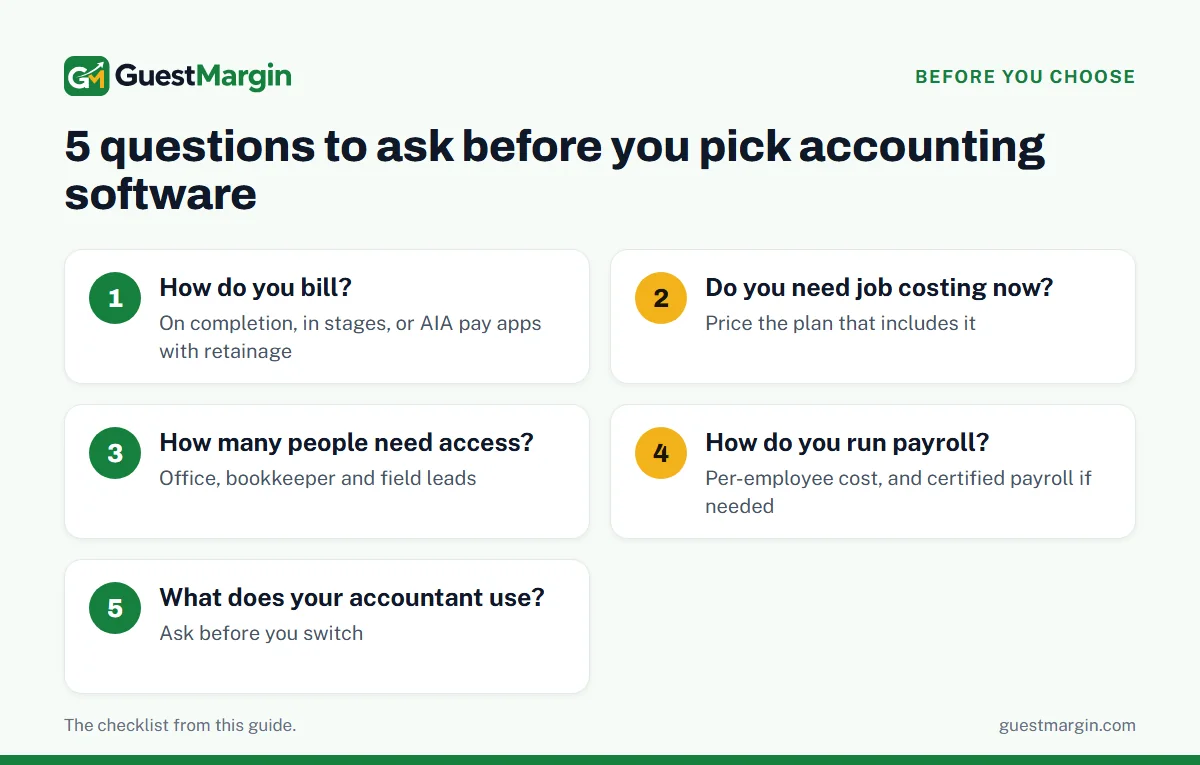
- How do you bill? On completion, a general tool is enough. Deposits and stages need progress invoicing. Pay applications with retainage need construction accounting or an add-on.
- Do you need job costing now? If yes, price the plan that has it: QuickBooks Online Plus, Xero Established, Zoho Books Professional or FreshBooks Premium.
- How many people need access? Count your office, bookkeeper and field leads. Xero has no per-user fees; QuickBooks Online caps users by plan.
- How do you run payroll? Check the payroll add-on price per employee, and whether you need certified payroll for prevailing-wage jobs.
- What does your accountant use? Ask before you switch. A bookkeeper who knows the software saves you money every month.
Whichever you choose, the numbers in your books are only as good as your estimates. If your job costing keeps showing thin jobs, revisit how you price a bid and how you handle change orders.
How We Evaluated This Accounting Software
We compared each tool using its own pricing page and official help documentation, checked November 22, 2026. We did not run paid trials and we do not assign scores. Tools are grouped by who they suit; the numbers make the list easy to navigate and are not a score. Where a vendor does not publish a price, fee or trial, or we could not confirm it, we say so instead of estimating.
Vendors cannot pay to change our picks or verdicts. Sponsored placements, if a page has one, are labeled and sit outside the picks. GuestMargin is our own product, so it is labeled and kept out of the numbered list. Read our editorial policy.
The Bottom Line
For most small contractors, QuickBooks Online Plus is the safe choice: project profitability tracking and sync with the contractor apps you are likely to use. Pick Xero if user fees matter, Zoho Books if you want progress invoicing cheaply, and FreshBooks or Wave if you work alone. Once you bill AIA pay applications with retainage or run certified payroll, move to construction accounting software such as Sage 100 Contractor or FOUNDATION, or add a contractor app on top of QuickBooks Online.
Clean books start with clear documents: see how to write an invoice that your accounting software can match to the job.
Frequently Asked Questions
What is the best accounting software for a small contractor?
For most small contractors, QuickBooks Online Plus, because it adds project profitability tracking and the common contractor apps sync with it. It lists at $140 a month for 5 users. If you work alone and don’t need job costing, Wave (free) or FreshBooks (from $23 a month) costs less.
Is QuickBooks good for contractors?
Yes, for most small and mid-size contractors. QuickBooks Online Plus and Advanced track project profitability, and QuickBooks Desktop Enterprise has a contractor edition with job costing reports. Neither lists AIA billing or retainage, so contractors who bill pay applications often add an app such as Knowify or move to construction accounting software.
What is the best free accounting software for contractors?
Wave’s Starter plan is free with unlimited estimates, invoices and bills, and Zoho Books has a free plan for businesses under $50,000 a year in revenue that includes 1099 contractor tracking. Neither free plan includes job costing.
What accounting software has job costing for contractors?
Among general tools: QuickBooks Online Plus and Advanced, Xero Established, Zoho Books Professional and up, and FreshBooks Premium. Construction accounting software such as Sage 100 Contractor, FOUNDATION and QuickBooks Desktop Enterprise builds job costing in, along with contract billing features.
Do contractors need construction accounting software?
Only if you bill on contract with AIA pay applications and retainage, run certified or union payroll, or need work-in-progress reporting. Service trades that bill on completion or in a few stages are usually well served by general accounting software with job costing.