
Part of our Contractor Guides
The best Jobber alternatives are Housecall Pro for crews that dispatch technicians, Kickserv and GorillaDesk for small teams that want more users for less, Service Fusion for unlimited users, and Joist or Square Invoices if you only need estimates and invoices. Workiz, FieldPulse and ServiceTitan don’t publish prices, so you need a demo or quote.
Disclosure: some vendor links on this page may be affiliate links. If you sign up through one, we may earn a commission at no extra cost to you. Sponsored placements are labeled and sit outside our picks. How we make money.
Most people look for Jobber alternatives for one of three reasons: the price climbs as the crew grows, a feature they need sits on a higher plan, or they only wanted estimates and invoices in the first place. The non-obvious part is how differently these tools charge for people. Jobber prices by plan and team size, Service Fusion and GorillaDesk list unlimited users, and Kickserv includes five users on its entry plan.
If you are still deciding between the two biggest names, read our full Jobber vs Housecall Pro comparison. For simple invoicing apps, see our contractor invoicing software comparison.
Prices checked November 21, 2026 on each vendor’s own pricing page; may change. Where a vendor does not publish a price or fee, we say so.
Quick Comparison: Jobber Alternatives at a Glance
Published entry prices run from free (Square Invoices) and $10 a month (Joist) for simple invoicing, to $49 to $60 a month for GorillaDesk and Kickserv, to $220 a month billed annually for Service Fusion. For reference, Jobber Core is $29 a month billed annually for one user. Three field service platforms only quote prices after a demo.
| Tool | Best for | Published starting price | Users | Free trial |
|---|---|---|---|---|
| Jobber (for reference) | Booking-led small teams | Core $29/mo annually, $49 monthly | 1 on Core; tiers to 15 | 14 days |
| Housecall Pro | Crews that dispatch technicians | Basic $59/mo annually, $79 monthly | 1, 5 or 8 by plan | 14 days |
| Kickserv | Small teams that want several users cheaply | Start $60/mo | 5 on Start | 30 days |
| GorillaDesk | Route-based services (pest, lawn, cleaning, pool) | Basic $49/mo (1 route) | Unlimited | 14 days |
| Service Fusion | Growing companies with many office and field users | Starter $220/mo billed annually | Unlimited | Not published (demo) |
| Workiz | Teams that want AI and automation tools | Not published | Not published | 7 days |
| FieldPulse | Teams that want a custom quote | Not published (seat-based) | Seat-based | Not verified |
| ServiceTitan | Larger residential and commercial trade companies | Not published | Not published | Not mentioned |
| Joist | Solo contractors who only need estimates and invoices | Basics $10/mo, $8.34/mo annually | See vendor site | 14 days |
| Square Invoices | Free estimates, contracts and card payments | Free; Plus $49/mo per location | See vendor site | Free plan |
Why Look for a Jobber Alternative?
The usual reasons are cost as the team grows, features on higher plans, and paying for scheduling you don’t use. Jobber’s Connect plan costs $149 a month billed annually for five users, and job costing waits until Grow. A tool with unlimited users, or a simple invoicing app, can cost less for the right business.
| If your reason is… | Look at | Why |
|---|---|---|
| Price per user as you hire | Service Fusion, GorillaDesk, Kickserv | Unlimited users (Service Fusion, GorillaDesk) or 5 users from $60/mo (Kickserv) |
| Dispatch, job costing and financing on the entry plan | Housecall Pro | Basic lists dispatch, job costing, price book and consumer financing |
| You only need estimates and invoices | Joist, Square Invoices, GuestMargin | No scheduling bill; Square Invoices and GuestMargin are free |
| You run routes (pest, lawn, pool, cleaning) | GorillaDesk | Priced per route with unlimited users |
| You run a larger multi-truck operation | ServiceTitan, Workiz, FieldPulse | Quote-based platforms aimed at bigger teams |
Our tool Not part of the ranked picks below
GuestMargin: free estimates and invoices, no account
If you left Jobber because you were paying for scheduling you didn’t use, GuestMargin makes estimates, quotes, invoices and change orders free in your browser. It does not send documents, collect e-signatures or take online payments today; those are planned for GuestMargin Pro.
Best Field Service Alternatives to Jobber
Housecall Pro, Kickserv, GorillaDesk and Service Fusion all publish prices and cover scheduling, estimates, invoicing and payments. They differ most in how they charge for users and what sits on the entry plan.
1 Housecall Pro: Best for crews that dispatch technicians
Housecall Pro is field service software built for home service companies.
What it does well. Its entry plan carries more than Jobber’s: Basic lists scheduling and dispatch, estimates, invoicing, payments, consumer financing, a price book, job costing and review management.
Key features:
- Dispatch, job costing, price book and financing on Basic
- Employee GPS, checklist automations and QuickBooks Online sync on Essentials
- Route optimization and recurring service plans on Max
Pricing. Basic $59/mo billed annually, $79 monthly (1 user); Essentials $149 / $189 (5 users); Max $299 / $329 (8 users, extra users $35/mo). Card rates “as low as 2.59%”, bank payments 1%. Source: Housecall Pro pricing.
Best for: home service crews with technicians in the field every day.
Limitations. For one user it costs about twice Jobber Core. Skip it if you work alone and rarely dispatch.
2 Kickserv: Best for small teams that want more users for less
Kickserv is field service software with plans sized by team.
What it does well. Five users on the entry plan for $60 a month, and the longest free trial in this list at 30 days.
Key features:
- Start for 5 users, Run for 10, Scale for 20
- 30-day free trial on each paid plan
- “Kickback” discount of 5% on monthly fees when online payments through Kickserv meet a monthly minimum
Pricing. Start $60/mo (5 users), Run $119/mo (10 users), Scale $199/mo (20 users); the vendor says annual billing saves 20%. A Premium tier’s price is not published, and QuickBooks Desktop integration is listed at $50/mo on Run. Payment fees are not published. Source: Kickserv pricing.
Best for: small teams of up to five who want everyone in the app for one low price.
Limitations. Annual prices, extra-user cost and payment fees are not published. Skip it if you need fully published costs before you sign up.
3 GorillaDesk: Best for route-based services
GorillaDesk is field service software priced by route, with industry pages for pest control, lawn care, cleaning and pool service.
What it does well. Unlimited users on every plan; you pay per route, where one route is one technician running their own schedule.
Key features:
- Invoices, estimates and basic routing on Basic
- QuickBooks Online sync, online booking, review generation, GPS tracking and a customer portal on Pro
- Sales pipeline and multi-branch support on Growth
Pricing. Basic $49/mo, Pro $99/mo, Growth $149/mo, each including one route, with added routes priced per plan. 14-day free trial, no credit card. Payment fees are not published (payments run through Stripe or Square). Source: GorillaDesk pricing.
Best for: pest control, lawn care, cleaning and pool companies that run recurring routes.
Limitations. Costs rise per route, and its focus is route-based service rather than project work. Skip it if you run one-off remodeling or construction jobs.
4 Service Fusion: Best for unlimited users at a flat price
Service Fusion is field service software for trades including HVAC, plumbing, electrical and roofing.
What it does well. Every plan includes unlimited users and QuickBooks Online and Desktop integration, so office staff and techs don’t add per-seat cost.
Key features:
- Unlimited users on every plan
- QuickBooks Online and Desktop integration on all plans
- Job costing and inventory management from Plus
- GPS fleet tracking as an add-on
Pricing. Starter $220/mo, Plus $339/mo, Pro $552/mo billed annually; the page also shows $259, $399 and $649 without an annual label, likely the month-to-month prices (its FAQ says month-to-month plans exist). A free trial is not published (it offers a demo). Payment fees are not published. Source: Service Fusion pricing.
Best for: companies with many office and field users, where per-user pricing would add up.
Limitations. A high entry price for a solo or two-person shop. Skip it if you have fewer than about five users.
Jobber Alternatives With Quote-Only Pricing
Workiz, FieldPulse and ServiceTitan don’t publish prices; you request pricing or book a demo. That makes budget comparison harder, but they are worth a call if you run a larger or faster-growing operation.
5 Workiz: Best for teams that want automation and AI tools
Workiz describes itself as built for field service businesses of every size, with Standard, Pro and Ultimate plans.
What it does well. A 7-day free trial with no credit card, and a Pro plan described as adding AI tools and stronger automations.
Pricing. Not published; each plan has a “Request pricing” button. The vendor says annual plans are discounted. Users and payment fees are not published. Source: Workiz pricing.
Best for: growing teams willing to talk to sales.
Limitations. No public prices to compare against Jobber.
6 FieldPulse: Best for a custom, seat-based quote
FieldPulse is field service software with seat-based pricing built around your team.
What it does well. You pay for the seats you need, with optional add-ons such as a price book, payments, financing, fleet tracking and custom forms.
Pricing. Not published; you get a custom quote through a demo. Free trial not verified. Source: FieldPulse pricing.
Best for: teams that want to buy only the modules they need.
Limitations. No public prices; add-ons are priced separately.
7 ServiceTitan: Best for larger trade companies
ServiceTitan is business management software for residential and commercial trades, aimed at companies from about four trucks up to multi-location operations.
What it does well. It is built for bigger operations, with Core, Demand AI, Field AI and MAX packages.
Pricing. Not published; the page offers “Get Pricing” and a demo. A free trial is not mentioned. Source: ServiceTitan pricing.
Best for: established trade companies running several trucks.
Limitations. Aimed well above a solo or two-person shop. Skip it if you have fewer than about four trucks.
Cheaper Jobber Alternatives If You Only Need Estimates and Invoices
If scheduling and dispatch were never your bottleneck, a simple estimate and invoice app costs far less. Joist starts at $10 a month and Square Invoices has a free plan with estimates and contracts.
8 Joist: Best for solo contractors on a phone
Joist is an estimating and invoicing app built for contractors.
What it does well. Contractor-focused estimates and invoices with deposits on every plan, for a fraction of field service pricing.
Pricing. Basics $10/mo monthly ($8.34 billed annually, 5 documents a month), Pro $17, Elite $32 (change orders on Elite and Run), per its pricing page. 14-day trial; the free plan is discontinued.
Best for: solo trades that only need estimates and invoices.
Limitations. No scheduling or dispatch, and change orders need Elite.
9 Square Invoices: Best free option with card payments
Square Invoices has a free plan that includes estimates and contracts.
What it does well. No monthly fee: you pay per card payment, 3.3% + 30¢ on Free or 2.9% + 30¢ on Plus ($49/mo per location), per its pricing page.
Best for: contractors who want estimates, contracts and card payments without a subscription.
Limitations. No field service scheduling, and the free plan has the higher card rate.
How Do You Choose the Right Jobber Alternative?
Start with your reason for leaving. If it’s cost per user, compare Kickserv, GorillaDesk and Service Fusion at your real headcount. If it’s missing features, check whether they sit on the alternative’s entry plan. If you never needed scheduling, move to a simple invoicing app and keep the savings.
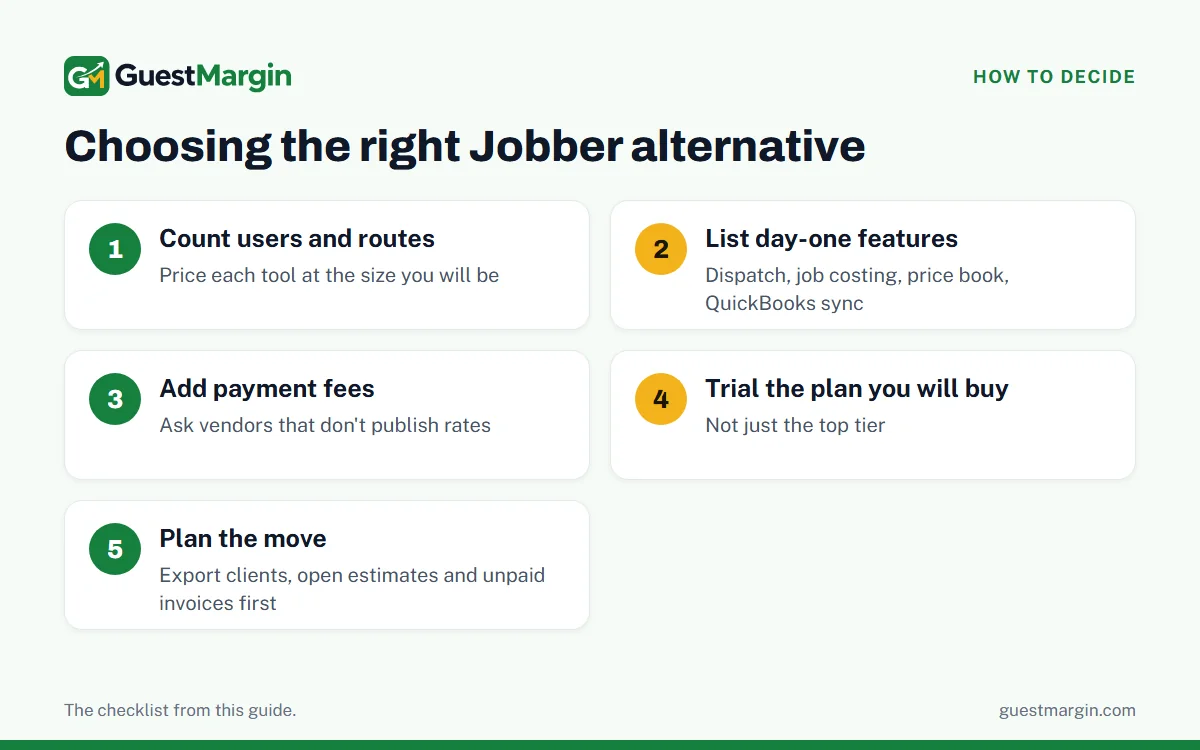
- Count users and routes today and in a year, then price each tool at that size.
- List day-one features (dispatch, job costing, price book, QuickBooks sync) and check the plan each sits on.
- Add payment fees. Only Jobber, Housecall Pro and Square publish rates here; ask the others before you sign.
- Use the trials on the plan you will actually buy.
- Plan the move. Export your clients, open estimates and unpaid invoices from Jobber before your plan ends.
Whatever tool you choose, your numbers still decide your profit: work out your labor cost, check markup vs margin, and set clear payment terms.
How We Evaluated These Jobber Alternatives
We compared each tool using its own pricing page, checked November 21, 2026. We did not run paid trials and we do not assign scores. Tools are grouped by who they suit; the numbers make the list easy to navigate and are not a score. Where a vendor does not publish a price, fee or trial, we say so instead of estimating.
Vendors cannot pay to change our picks or verdicts. Sponsored placements, if a page has one, are labeled and sit outside the picks. GuestMargin is our own product, so it is labeled and kept out of the numbered list. Read our editorial policy.
The Bottom Line
The best Jobber alternative depends on why you’re leaving. Housecall Pro fits crews that dispatch; Kickserv and GorillaDesk fit small teams that want more users for less; Service Fusion fits bigger teams that want unlimited users; Workiz, FieldPulse and ServiceTitan need a sales call. If you only needed paperwork, Joist, Square Invoices or our free maker will do the job for far less.
Before you switch, get the estimate itself right: see how to write an estimate.
Frequently Asked Questions
What is the best alternative to Jobber?
For crews that dispatch technicians, Housecall Pro is the closest alternative; its Basic plan includes dispatch, job costing, a price book and financing. For small teams on a budget, Kickserv includes five users for $60 a month. If you only need estimates and invoices, Joist or Square Invoices costs much less.
Is there a cheaper alternative to Jobber?
Yes, depending on team size. Kickserv’s Start plan is $60 a month for five users, while Jobber Connect for five users is $149 a month billed annually. For simple invoicing, Square Invoices has a free plan and Joist starts at $10 a month, per vendor pricing pages checked in November 2026.
Which Jobber alternatives have unlimited users?
Service Fusion and GorillaDesk list unlimited users on every plan. Service Fusion starts at $220 a month billed annually; GorillaDesk starts at $49 a month and charges by route instead of by user.
Is there a free alternative to Jobber?
Not a free field service platform in this list. For estimates and invoices, Square Invoices has a free plan that takes card payments, and GuestMargin (our tool) is free with no account, though it does not take online payments yet.
How do I switch from Jobber to another app?
Export your client list, open quotes and unpaid invoices before your Jobber plan ends, start the new tool’s free trial on the plan you intend to buy, and run both side by side for a week. Ask the new vendor whether it offers data migration; GorillaDesk lists free migration.